Dush provides instant search and offline access tools for custom help files and offers a toolset in the Xcode editor.
Features:
1. Quick search in the Xcode editor without selecting text (Xcode extension)
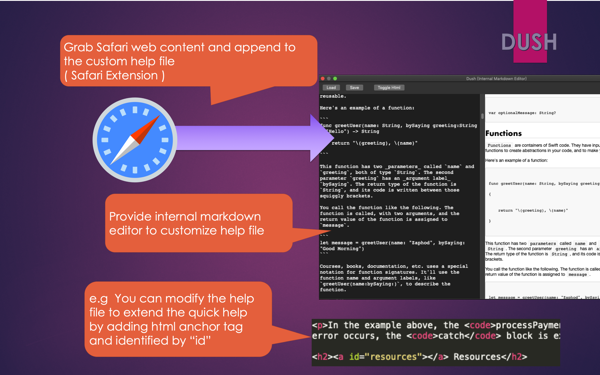
2. Select and grab Safari web content to expand help files (Safari extension)
3. Internal Markdown editor for custom help files
4. Provide a toolset for Xcode coding. (Xcode extension)
- Convert JSON to Swift
- Code alignment
- Initialize code generator
- Quickly comment lines
- Sort import commands
- Paste clipboard content in the form of Base64 strings, Unicode strings, etc.
To install all extensions, follow these steps:
* Launch DUSH from the application folder.
* Enable the DUSH extension in System Preferences > Extensions > Xcode Source Editor.
* Restart Xcode.
* Use the Editor > DUSH menu to get quick help for the keyword you just entered nearby.
* You can choose to set keyboard shortcuts from Xcode > Preferences > Keyboard Shortcuts.
* Launch the DUSH program before using the editor menu.
* Launch Safari and enable the extension in Safari > Preferences > Extensions.
Support email address: answer80@hotmail.com


 +100宝石


 分享
分享









用户评价
立即分享产品体验
你的真实体验,为其他用户提供宝贵参考
💎 分享获得宝石
【分享体验 · 获得宝石 · 增加抽奖机会】
将你的产品体验分享给更多人,获得更多宝石奖励!
💎 宝石奖励
每当有用户点击你分享的体验链接并点赞"对我有用",你将获得:
🔗 如何分享
复制下方专属链接,分享到社交媒体、群聊或好友:
💡 小贴士
分享时可以添加你的个人推荐语,让更多人了解这款产品的优点!
示例分享文案:
"推荐一款我最近体验过的应用,界面设计很精美,功能也很实用。有兴趣的朋友可以看看我的详细体验评价~"
关注 Mergeek 公众号
领奖遇到问题?联系小门助手