



 +100宝石



产品功能
SendEvent — Send Calendar Events
Simply send a calendar event to someone.
sendevent lets you take an event from your calendar and send it to a friend, family member, colleague, or anyone else.
Not calendar sharing. Not an invitation. Not adding someone to your event.
Simply send the event information so the recipient can add it to their own calendar.
Two simple ways to send
Send as Text
Send a clear, readable version of the event, including the title, date, time, location, notes, and URL.
Send as Calendar File (.ics)
Send the event as a standard .ics calendar file, with all available fields, allowing the recipient to open it and add the event to their own calendar.
Features
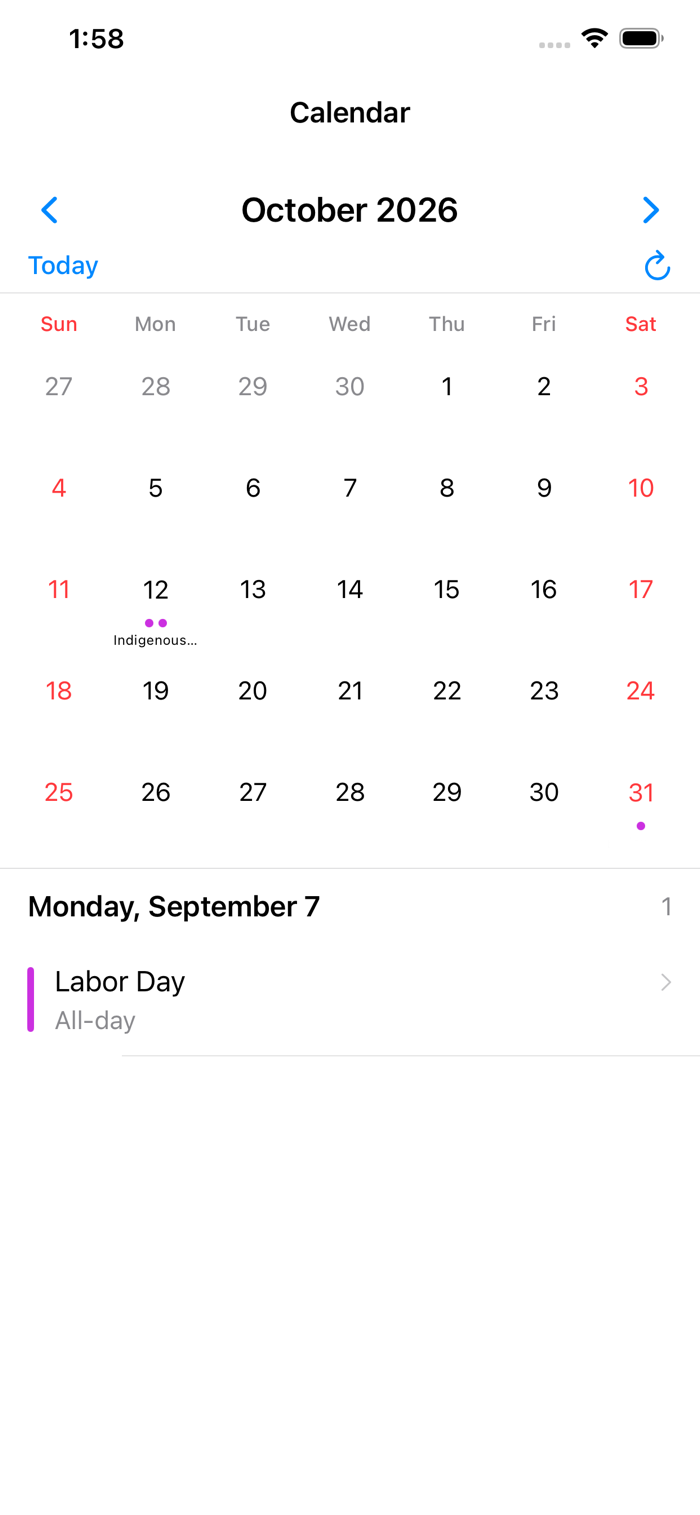
* Browse your calendar by month
* Manually fetch the latest calendar events
* Automatically refresh events when the app starts or returns to the foreground
* Select an existing event
* View event details
* Send an event as readable text
* Send an event as a standard .ics calendar file
* Send through Mail, Messages, AirDrop, Files, and other available iOS options
* Works on iPhone and iPad
Calendar Access & Privacy
To use sendevent, you need to allow Full Access to your Calendar. This allows the app to read your existing calendar events so you can select and send them.
Your calendar information stays on your device. sendevent does not upload your calendar data to a server or require an account. Your calendar information is only sent when you choose to send an event using the iOS sharing system.
Simple and read-only
sendevent does not create, edit, or delete your calendar events. It does not share your calendar or invite people to your events.
It simply takes an event that already exists in your calendar and lets you send it to someone else.
Your event. Simply send.
*Important notice:
Use the information recoded or functionality provided in / or generated with this application only as a rough indication, rough estimates or as a rough guide. Even though we do our best to provide you with confirmed information and tried-and-tested features, the accuracy and successful operation and performance of the application are NOT GUARANTEED by us. Users are strongly advised to confirm the information of their interest with other sources and not to ultimately rely on functionality and performance of this application. This application is provided “as is” and with all faults. You bear the risk of using it. We shall not be responsible or liable for any loss or damage of any kind incurred as a result of the use of functions or the content of this application. By using this application you are agreeing to these terms. If you do not agree to these terms do not use this application.
分享「」体验,参与「」抽奖!
分享 1~3 张你对这个产品最满意的截图或效果图
分享「」体验,参与「」抽奖!
用你的故事点亮社区✨!你的真实体验,将会永久展示在 官方主页 📌,为其他朋友提供宝贵参考 💡。立即分享吧!🚀
请为产品评分
请选择问题回答,为大家提供宝贵参考
选择要回答的问题
温馨提示
你尚未上传产品截图。
上传截图可立即获得宝石积分奖励!
如果你赶时间,也可稍后修改评论,补上截图领取宝石。
温馨提醒
你尚未添加产品截图
⚠️ 不添加截图将降低抽奖权重

感谢参加,你已成功参加!
为了确保你能及时收到审核结果和领奖码通知

扫描二维码关注 Mergeek 公众号
在后台回复 「获奖通知」
完成上述操作,即可保障奖励发放成功





用户评价
立即分享产品体验
你的真实体验,为其他用户提供宝贵参考
💎 分享获得宝石
【分享体验 · 获得宝石 · 增加抽奖机会】
将你的产品体验分享给更多人,获得更多宝石奖励!
💎 宝石奖励
每当有用户点击你分享的体验链接并点赞"对我有用",你将获得:
🔗 如何分享
复制下方专属链接,分享到社交媒体、群聊或好友:
💡 小贴士
分享时可以添加你的个人推荐语,让更多人了解这款产品的优点!
示例分享文案:
"推荐一款我最近体验过的应用,界面设计很精美,功能也很实用。有兴趣的朋友可以看看我的详细体验评价~"
关注 Mergeek 公众号
领奖遇到问题?联系小门助手