
 +100宝石

加入 Mergeek 福利群
扫码添加小助手,精彩福利不错过!
若不方便扫码,请在 Mergeek 公众号,回复 群 即可加入
- 精品限免
- 早鸟优惠
- 众测送码

HEIC转换器 - 批量将HEIC转JPG或PNG-无需上传
Free HEIC Conversion Tool, Compatible with Mac, Supporting Batch Format Conversi...
 分享
分享


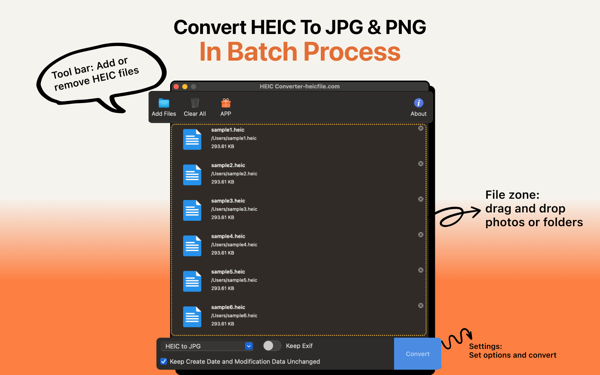





AnyHEIC is a free HEIC conversion tool that is compatible with all macOS systems, including models with M1/M2/M3 chips. It supports batch conversion of HEIC to JPG and PNG formats, retains all EXIF information of photos as well as the original creation and modification dates, can operate offline without data uploading, has a fast processing speed, and a user-friendly interface. For help, you can contact support@heicfile.com or visit the website https://heicfile.com.












用户评价
立即分享产品体验
你的真实体验,为其他用户提供宝贵参考
💎 分享获得宝石
【分享体验 · 获得宝石 · 增加抽奖机会】
将你的产品体验分享给更多人,获得更多宝石奖励!
💎 宝石奖励
每当有用户点击你分享的体验链接并点赞"对我有用",你将获得:
🔗 如何分享
复制下方专属链接,分享到社交媒体、群聊或好友:
💡 小贴士
分享时可以添加你的个人推荐语,让更多人了解这款产品的优点!
示例分享文案:
"推荐一款我最近体验过的应用,界面设计很精美,功能也很实用。有兴趣的朋友可以看看我的详细体验评价~"
关注 Mergeek 公众号
领奖遇到问题?联系小门助手