Savings turns your money into one honest number — your monthly savings score — and on-device AI does the heavy lifting. Snap a receipt, type "lunch 250," or ask "how much did I spend this month?" — AI handles the rest. Beautifully simple, completely private.
SCAN A RECEIPT OR TRANSFER SLIP WITH AI
Point your camera at a receipt or transfer slip — or pick one from your library — and on-device AI reads the total, date, and merchant and fills in the transaction — the image never leaves your iPhone. Turn on auto-scan to log receipts when you open the app; your first scans are free.
QUICK ADD — JUST TYPE IT
In a hurry? Type it in plain words — "lunch 250," "taxi 80," "salary 45000" — and Savings logs it in one tap, filling in the amount and category. A fast parser handles it free; AI steps in for anything trickier.
ASK AI ABOUT YOUR MONEY
On the Search tab, ask in plain words — "what's my biggest expense?" — and on-device AI answers from your own transactions. Your first questions are free.
KNOW YOUR SCORE
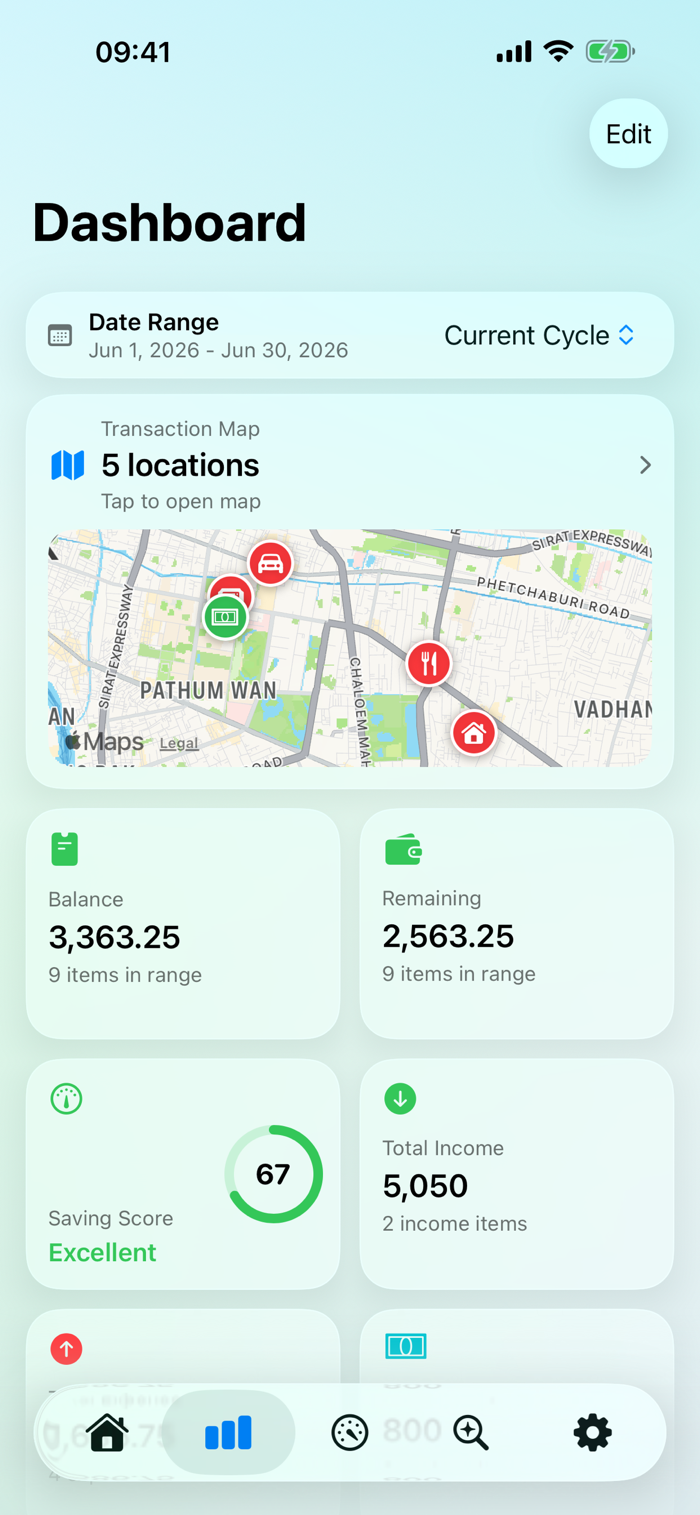
Every transaction rolls up into a single 0–100 score for the cycle — the share of your income you actually saved. One glance shows if you're on track: Excellent, Good, Fair, or at Risk.
LOG IN SECONDS
Prefer to tap? Pick a category, type the amount, tag the place — done. Or just ask Siri: "add a transaction in Savings."
CATEGORIES THAT FIT YOU
Need more than the built-ins? Create your own — name it, pick an icon, choose its type — free and unlimited. They work everywhere: pickers, budgets, dashboard, CSV.
A DASHBOARD THAT GOES DEEP
A configurable grid of cards shows totals, averages, category breakdowns, a spending map, and trend graphs — including a saving-score trend. Filter by cycle, year, a custom range, or all time.
BUDGETS THAT KEEP UP
Give any category a budget — a fixed amount or a share of your income — save favorites as a preset, and watch usage in a dedicated Budget tab. Set the day your month starts, and everything regroups.
SAVE, INVEST & SET GOALS
Set money aside as Savings — kept, not spent, so your score stays honest. Track returns as Capital Gain, by amount or an estimated %. Build long-term goals like an emergency fund, and set per-cycle savings targets.
RECURRING, DONE RIGHT
Rent, salary, subscriptions — set them once and they repeat. Edit or delete one occurrence, all, or just future ones.
REMINDERS THAT KEEP YOU ON TRACK
Set a reminder so a bill never slips, and opt into a daily nudge to log spending plus a daily score summary.
HOME & LOCK SCREEN WIDGETS
Keep your finances a glance away with free Home Screen and Lock Screen widgets — saving score, cycle overview, savings, latest transactions, budgets, and Quick Add.
YOURS, EVERYWHERE
Built for iPhone, iPad, Mac, and Apple Vision Pro, each with a native layout. Your data and settings sync in real time through your own iCloud.
PRIVATE BY DESIGN
No account. No sign-up. No tracking. Even the AI runs on your device — your finances never touch our servers, only your private iCloud. Export to CSV any time; full backups keep your photos, notes, and settings.
SPEAKS YOUR LANGUAGE
Fully localized in English, Thai, Simplified Chinese, and Japanese, with matching currency.
LOCKED WHEN YOU NEED IT
Add an optional passcode and unlock with Face ID or Touch ID, so your finances stay yours even if your phone doesn't.
FREE TO USE
The full app — scoring, logging, savings & goals, dashboard, budgets, recurring, CSV export, widgets, app lock, Quick Add, and 20+ categories — is free. Optional one-time unlocks add more:
• Receipt Scanning & AI Quick Add — unlimited AI receipt & slip scanning, plus AI Quick Add by typing & auto-scan (first uses free)
• Search & Ask AI — unlimited AI answers about your money (first questions free)
• All Widgets — every advanced dashboard card, chart & breakdown
• Category Pack — every specialized income & spending category
No subscriptions. Buy once, keep forever.
Start today — snap, type, ask, save, and watch your score climb.


 +100宝石

 分享
分享













用户评价
立即分享产品体验
你的真实体验,为其他用户提供宝贵参考
💎 分享获得宝石
【分享体验 · 获得宝石 · 增加抽奖机会】
将你的产品体验分享给更多人,获得更多宝石奖励!
💎 宝石奖励
每当有用户点击你分享的体验链接并点赞"对我有用",你将获得:
🔗 如何分享
复制下方专属链接,分享到社交媒体、群聊或好友:
💡 小贴士
分享时可以添加你的个人推荐语,让更多人了解这款产品的优点!
示例分享文案:
"推荐一款我最近体验过的应用,界面设计很精美,功能也很实用。有兴趣的朋友可以看看我的详细体验评价~"
关注 Mergeek 公众号
领奖遇到问题?联系小门助手