Strix Editor brings serious SQLite work to iPad. Browse, query, and edit any SQLite database with a native iPad app built on SwiftUI (No Catalyst).
SAFE BY DEFAULT
Your database is read-only until you explicitly enable Edit Mode. Every modification (inline edits, cell editor sheets, or SQL DML statements) requires Edit Mode. The Pending Changes tab shows every change grouped by table, reviewable before you commit. Confirmation dialogs protect against accidental data loss.
VISUAL EDITING WITH FULL CONTROL
Tap a cell to open the editor sheet for type-aware editing. Insert, delete, or duplicate rows with full undo/redo. The detail panel shows long values in a dedicated pane. Multi-row selection lets you operate on hundreds of rows at once.
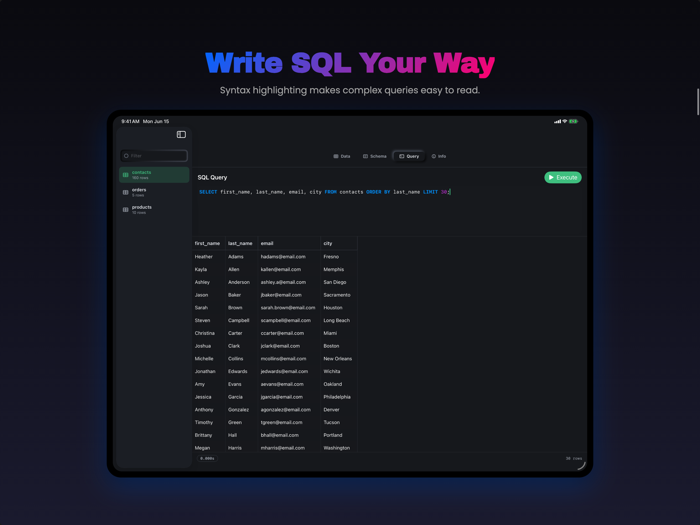
SQL QUERY EDITOR
Write SQL with syntax highlighting: keywords, functions, strings, numbers, and comments are color-coded. SELECT queries work anytime; INSERT, UPDATE, and DELETE require Edit Mode.
GLOBAL SEARCH
Search across every table simultaneously. Results open in their own tabs, each preserving the search context. Full-text search (FTS5) with temporary index building handles large tables.
SCHEMA INSPECTOR
View columns, indexes, triggers (with full SQL), and CREATE statements. Browse database views alongside tables. Inspect database statistics: file size, row counts, SQLite configuration.
FILES APP READY
Open .sqlite, .db, .csv, .tsv, .json, and .xlsx files. Exc...


 +100宝石


 分享
分享














用户评价
立即分享产品体验
你的真实体验,为其他用户提供宝贵参考
💎 分享获得宝石
【分享体验 · 获得宝石 · 增加抽奖机会】
将你的产品体验分享给更多人,获得更多宝石奖励!
💎 宝石奖励
每当有用户点击你分享的体验链接并点赞"对我有用",你将获得:
🔗 如何分享
复制下方专属链接,分享到社交媒体、群聊或好友:
💡 小贴士
分享时可以添加你的个人推荐语,让更多人了解这款产品的优点!
示例分享文案:
"推荐一款我最近体验过的应用,界面设计很精美,功能也很实用。有兴趣的朋友可以看看我的详细体验评价~"
关注 Mergeek 公众号
领奖遇到问题?联系小门助手